
Education
Building Trusted Learning Ecosystems in Moodle That Are Ready for What's Next
How Moodle Marketplace and Certified Integrations make it easier for institutions to find trusted solutions and build more inclusive learning experiences.
April 17, 2024
The loss of the AccessText Network has the higher education industry scrambling. Get the story, plus some tips for coping, here.
On April 1st, 2024, the Georgia Institute of Technology announced that the AccessText Network was finished. Shortly thereafter, the service’s website disappeared.
The sudden loss of this resource left school administrators scrambling for accessible textbooks, and with a summer term right around the corner!
Whether you relied on AccessText or you’re just looking for a better way to bring accessible course materials to students with disabilities, you probably have questions about where to go from here. Find answers to the following questions below:
As you work to fill the gap left by AccessText, you can always turn to ReadSpeaker for help. We offer reading tools and text to speech (TTS) natively in your learning management system (LMS), online, or anywhere else your students learn. These solutions go a long way toward meeting your institution’s accessibility goals.
With that in mind, here’s what’s going on with AccessText.
Need accessible course materials fast? ReadSpeaker’s TTS reading tools integrate with all major learning platforms.
Contact us to get startedThe AccessText Network was a partnership between four stakeholders:
AccessText was also a digital platform that facilitated the distribution of accessible learning materials, namely, electronic editions of print textbooks.
The platform is what went down in April 2024. As for the partnership, that remains up in the air as we publish.
How big of a deal is the loss of AccessText? According to the now-defunct service’s website, pretty big.
While www.accesstext.org is a dead site as we publish, we looked back to the site’s heyday using the Internet Archive’s Wayback Machine. (opens in a new tab)
It appears that the AccessText Network hit its high point around 2018, when it listed some impressive statistics. That year, AccessText boasted:
These numbers underscore the difficulty former AccessText subscribers are facing. If the current statistics are anywhere similar, then, that means close to 3,000 schools were suddenly deprived of a way to get digital texts in a timely manner. That’s the challenge the industry faces at this moment.
The AccessText Network’s core service was delivering digital copies of print textbooks. By all accounts, the process was simple, and looked something like this:
This act of digitization wasn’t enough to greatly improve textbook accessibility, however. It was just the first step.
With AccessText, it was usually up to the receiving institution to take that next step: creating an audiobook with text to speech (TTS), producing a braille document, enlarging the digital text, or providing focus tools like page masks, for example.
There’s a chance we’ll only need temporary solutions for the current absence of AccessText. While Georgia Tech may have ceased its work on the project, the Association of American Publishers says it remains committed to the cause.
An April 2024 announcement (opens in a new tab) from the industry group states that:
“The Association of American Publishers (AAP) remains deeply committed to supporting efforts to meet the needs of individuals with disabilities and we are assessing how best to expeditiously restore the [AccessText Network] service.”
As we publish, AccessText remains unavailable. But it appears that the Association of American Publishers is trying to bring it back, in what form, who can say?
The AccessText Network’s core task was to deliver digital versions of print textbooks quickly. While no service is exactly the same as AccessText, that is, no one offers the exact same list of participating publishers, there are a few solutions disability service providers can use to make sure their students get more accessible learning materials.
These include the following options:
As we mentioned, though, getting a textbook into a digital format is just the first step toward greater accessibility.
A truly accessible text depends on the individual reading it: Does the student have a vision impairment, a learning disability, attention challenges, or other barriers that could be removed by changing the manner of presentation? The helpful tool will be different for each.
To support accessibility for your students, then, you need tools that change the way readers experience textbooks in a variety of ways. That’s where ReadSpeaker can help.
Every student has different needs. According to Universal Design for Learning (UDL), educators should meet these needs by offering choice over the means of presentation.
The best way to do this is to offer a set of accessibility tools within the student’s existing learning environment. ReadSpeaker’s enhanced TTS solutions integrate directly into all major learning platforms, so students don’t have to open another app or window to access the tools.
Recommended accessibility features for college learners include:
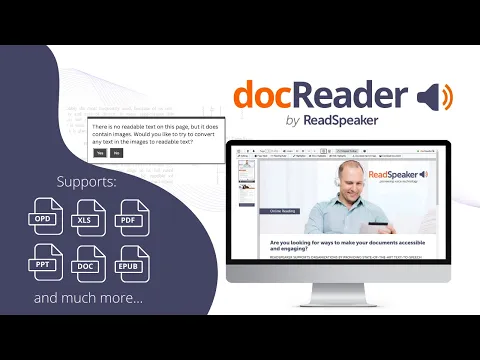
For scanned print documents, be sure to choose an accessibility tool that includes optical character recognition (OCR) technology. Without OCR, your TTS system may struggle to interpret scanned documents, or even skip words within images. Optical character recognition supports accessibility for scanned paper documents, images, photographed text, and other legacy materials.
Finally, it helps to give students the option to download audio files of their textbooks (or any other document). That way, they can listen offline: meeting the widespread preference for studying while driving, cooking, exercising, or whatever else today’s busy students do.
ReadSpeaker docReader offers all these tools and more, including advanced OCR that allows users to copy, annotate, and listen to scanned documents (including words within images). docReader brings these capabilities to all major LMSs. And while docReader supports all major e-book formats (.RTF.EPUB.PDF), it also works with all Microsoft Office and Apache OpenOffice/LibreOffice files.
 (play video)
ReadSpeaker TextAid, meanwhile, includes these features plus writing tools like dictation (speech to text) and predictive auto-complete.
TextAid also includes an Exam Mode, which allows instructors to speech-enable tests while removing features that may give an unintended advantage (like translation or the integrated dictionary).
ReadSpeaker’s accessibility tools won’t replace the AccessText Network. But once you get your texts into a digital format, these WCAG 2.2-compliant TTS solutions allow students to customize their own experiences. That empowers the user to construct their own accessible experience, with or without AccessText.
Ready to give your students the power to listen rather than read?
Contact ReadSpeakerEducation
How Moodle Marketplace and Certified Integrations make it easier for institutions to find trusted solutions and build more inclusive learning experiences.
Education
See how ILIAS and ReadSpeaker's text-to-speech technology work together to create more flexible learning experiences, with insights from the University of Stuttgart.
Education
Over the past year, we’ve immersed ourselves in the digital assessment community, through conferences, webinars, research, podcasts, and conversations with assessment leaders. Along the way, several themes have consistently emerged. These are the ideas we believe are shaping the future of accessible digital assessment.