Education
Integrity Meets Inclusion: Building Reliable Online Assessments in the Age of AI
Discover how ReadSpeaker and SMOWL combine academic integrity and accessibility to support reliable, inclusive online assessments within the Moodle ecosystem.
August 27, 2024
Does free text to speech make your digital learning content accessible enough, or should you pay for ReadSpeaker TTS? Find out here.
Around the world, more than 1 billion people (opens in a new tab) have disabilities. That includes 7.5 million (opens in a new tab) U.S. public school students, a full 15% of these learners. Many of these disabilities make reading a serious barrier to student success: vision impairments, dyslexia, specific learning disabilities (the most common among U.S. public school students), and more.
This is why assistive technology like text to speech (TTS), software that reads written language out loud, is essential for any educational endeavor, from the elementary school classroom to e-learning courses to corporate training.
At ReadSpeaker, we’ve been developing high-quality TTS voices and tools for well over two decades. Digital accessibility was our founding mission, and we continue to specialize in TTS-based assistive technology for the education field.
But ReadSpeaker’s TTS solutions aren’t free, and you can find free text to speech just about anywhere these days. Both options have their place. But which is right for your school or training program?
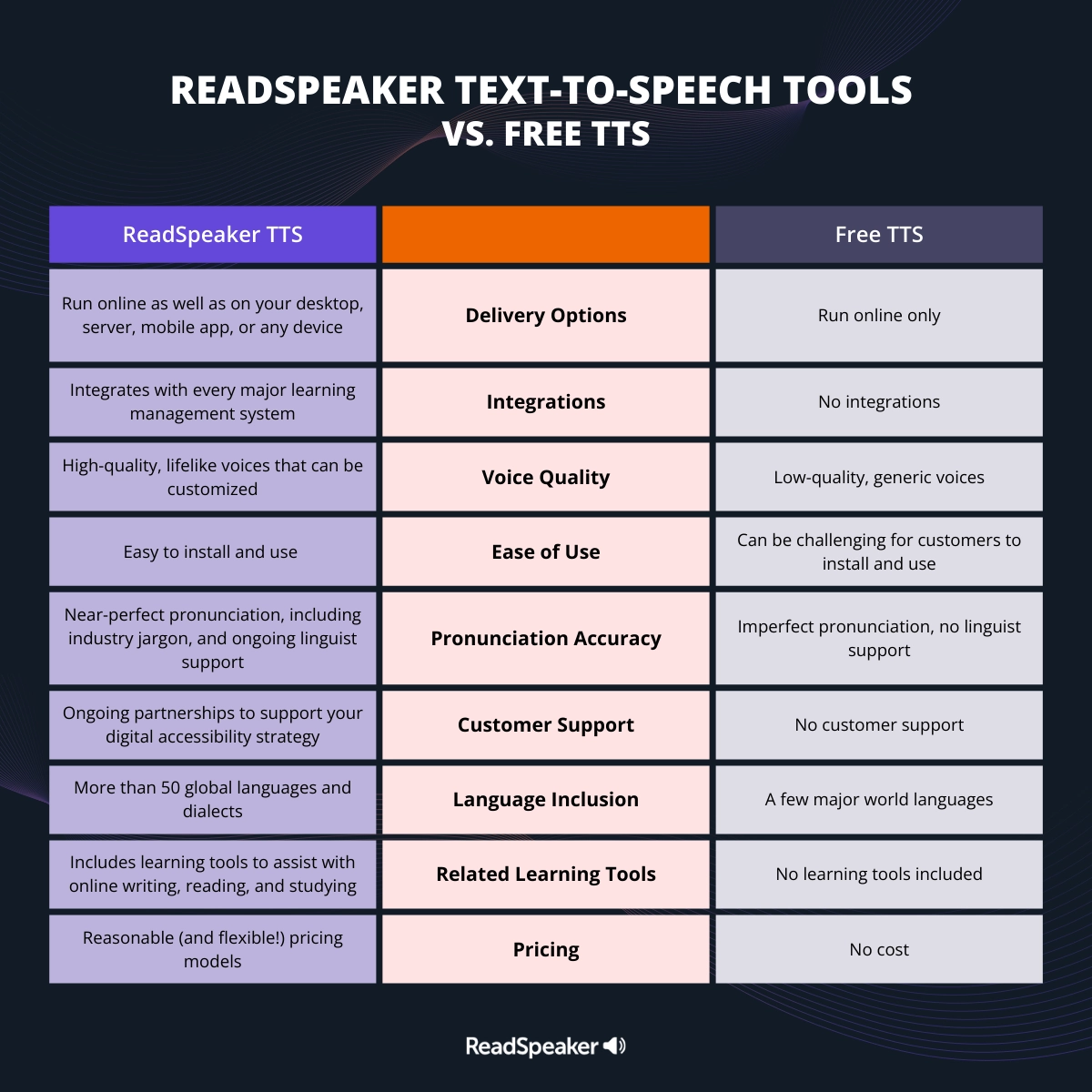
Here are the comparative benefits of ReadSpeaker’s education-enhancing text-to-speech software and free TTS technology, along with a few use cases for each.
Both ReadSpeaker TTS tools and their free counterparts provide an audio alternative to written text. They help with online learning, in-class assignments, assessments, studying, research, and any other learning task that involves digital content. The similarities end with these use cases, however.
Here are nine key areas of differences between ReadSpeaker and a free TTS system:
 (play video)
As this list illustrates, the strongest benefit of free TTS is that it’s, well, free.
As we mentioned, however, you can’t always trust that claim. Many TTS tools that purport to be free offer severely limited access before prompting you to “buy” characters or pay for an audio file.
In the era of voice AI, there are also ethical issues to consider when choosing a TTS tool. All AI voices are based on human voice recordings; the voice actors who make those recordings have rights.
The Web Content Accessibility Guidelines (WCAG) are the global standard for removing digital barriers. These guidelines are organized according to four principles. The first is that content must be perceivable to as many users as possible.
What does that mean? WCAG’s creators at the World Wide Web Consortium (W3C) offer a simple explanation (opens in a new tab):
[Perceivable] means that users must be able to perceive the information being presented (it can’t be invisible to all of their senses).
Of course, different students may have access to different senses. One may see but not hear. Another may have vision impairments and perfect hearing. A third may have dyslexia or learning disabilities that make it hard to grasp the written word. Even users without disabilities have unique media preferences, which could affect their ability to absorb digital content.
That places any tool that provides content in multiple formats squarely within the category of assistive technology (AT), and makes TTS a helpful tool for conforming with the WCAG’s first principle of accessibility.
At ReadSpeaker, we work hard to protect all our stakeholders, from voice talent to customers to your end users. We negotiate fair contracts with voice actors to produce our AI training data, and we can show you those receipts.
If you find a particularly lifelike free TTS voice, odds are it’s based on a human speaker. Ask if that speaker has signed off on this use of their voice. If the TTS provider can’t tell you, it’s best to steer clear.
That’s not to say that there’s no place for free TTS in your assistive technology toolkit. You may find TTS built into an operating system like Microsoft Windows, Android, or iOS. It’s debatable whether these tools are “free” (after all, you paid for the device!) but it’s undeniable that they can make content more accessible.
If you’re an educator, administrator, or school accessibility officer, however, text to speech from ReadSpeaker is your best bet. Contact us today for a free quote.
Education
Discover how ReadSpeaker and SMOWL combine academic integrity and accessibility to support reliable, inclusive online assessments within the Moodle ecosystem.
Education
How Moodle Marketplace and Certified Integrations make it easier for institutions to find trusted solutions and build more inclusive learning experiences.
Education
See how ILIAS and ReadSpeaker's text-to-speech technology work together to create more flexible learning experiences, with insights from the University of Stuttgart.