Education
Integrity Meets Inclusion: Building Reliable Online Assessments in the Age of AI
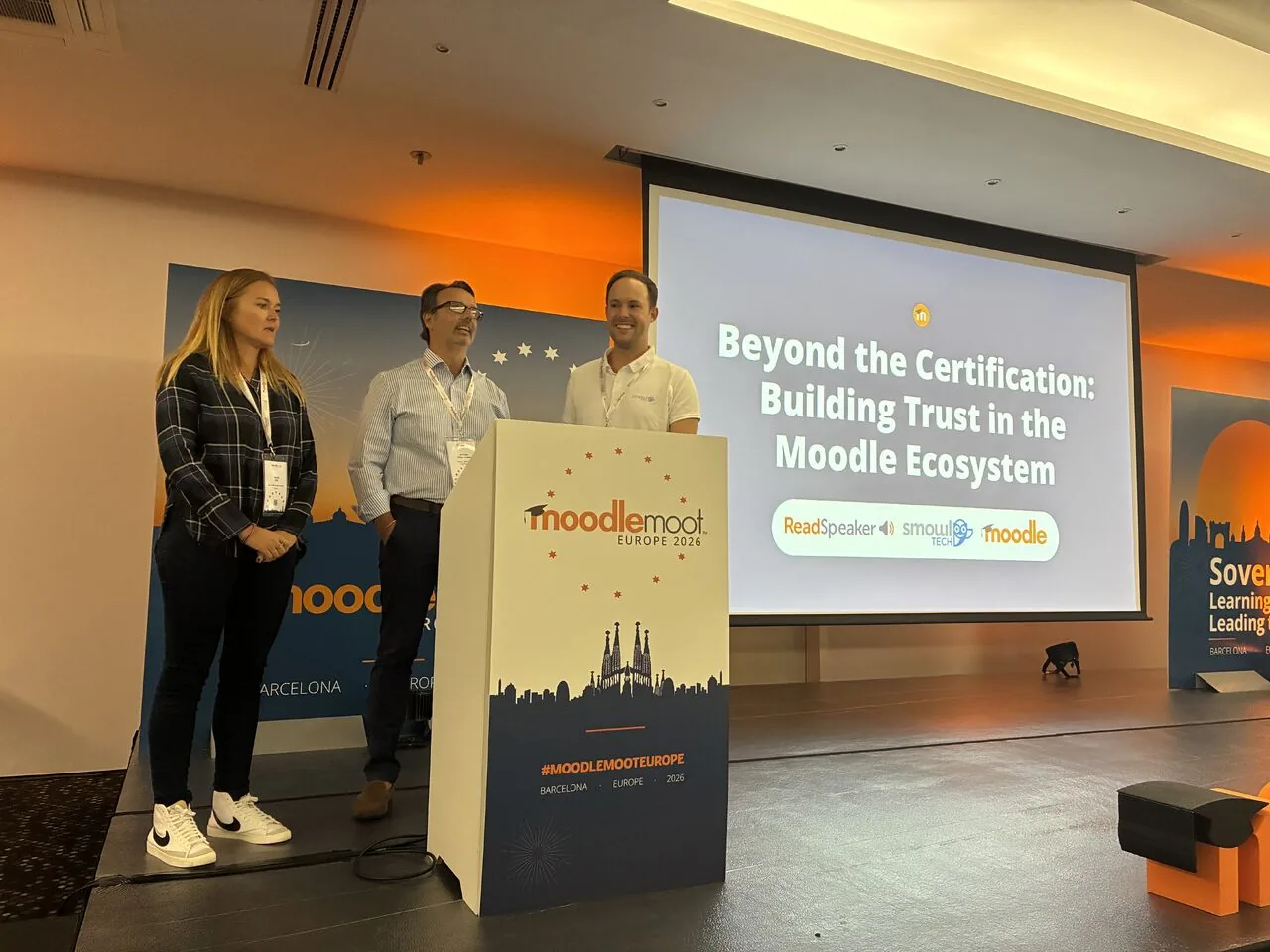
Discover how ReadSpeaker and SMOWL combine academic integrity and accessibility to support reliable, inclusive online assessments within the Moodle ecosystem.
May 30, 2025
Not sure how text to speech improves education for students at every level? Find out in this detailed FAQ.
Want to know more about text to speech (TTS) in education? Here are the answers to 21 common questions, including information about how to use text to speech to support, attract, and retain learners.
With all the new developments in education technology, the learning landscape is changing rapidly. There are more and more ways for learners to consume course content, and expectations for how educators provide that content are higher than ever.
Technology tools help to level the playing field, allowing learners to choose to engage with learning materials in a way that works best for them. In this new environment, administrators, course designers, and educators must be aware of the many different available content forms, including text to speech (TTS) which digitally “reads” written content out loud.
Audio is an important and growing segment of this education technology revolution, and savvy institutions know how to exploit this powerful medium.
At ReadSpeaker, we are specialists in voice technology. We understand both why and how to implement audio in coursework. Our aim is to help educational institutions understand and utilize audio in their educational offerings. To further those aims, we put together this list of the questions that we hear from institutions about TTS and audio-enhanced content for education. More importantly, we provide answers.
Hear for yourself!
Request a demoText to speech, or TTS for short, converts text into spoken voice output. Not to be confused with speech to text, which converts spoken inputs into written outputs, text-to-speech systems offer a computer-generated voice that “reads” text to the user.
Today’s TTS systems operate on the cloud, embedded in servers, or even on devices alone. Depending on the TTS engine, the software that generates synthetic speech, they’re compatible with virtually any digital text format, including scans of print documents.
That leads to powerful educational assistance for students with vision impairments. It supports struggling readers as they learn. And it’s an essential tool for second-language learners working to integrate written and spoken expressions in a new tongue.
But TTS isn’t just an assistive technology; it’s a comprehensive education technology.
As we’ll discuss later in this FAQ, TTS provides learning benefits for all learners, regardless of circumstances. Text to speech allows the busy adult learner to study, hands-free, while cooking dinner. It offers relief from screen fatigue for online students. Most of all, TTS offers choice, allowing individual learners to customize the education experience to match their unique needs and preferences.
The benefits of text to speech aren’t limited to K-12 or higher education. This technology is also widely used in corporate learning and development (L&D), workplace training, and adult learning programs (including those at correctional institutions).
Text to speech is helpful for serious games and virtual reality simulations, which are increasingly used in medical education (opens in a new tab), workplace safety training (opens in a new tab), and engineering skill development (opens in a new tab). A TTS production tool allows developers to generate or update dialog instantly, significantly reducing development timelines.
In fact, TTS improves any educational scenario that involves text, which is to say virtually all of them. In the corporate context, TTS provides accommodations for employees with disabilities, as required by the Americans with Disabilities Act (opens in a new tab) and equivalent accessibility laws in countries around the world.
Text to speech also improves training outcomes by helping employees retain learning materials. It also simplifies the creation of course materials, allowing content creators to generate top-quality voice overs in an instant.
Text to speech engines can indeed create downloadable audio files of spoken text content, typically in the ubiquitous mp3 format. But they don’t stop there. They also provide immediate playback through your application, browser, or learning management system (LMS).
Going a step further, many TTS tools also provide “bimodal presentation,” which incorporates accompanying highlighting so that students can read along with the highlighted text as they listen to the content.
Text to speech may also be integrated in various other ways so that the student can listen to what they are typing into documents or search engines. Any number of speech-enhanced tools use TTS to provide essential functionality.
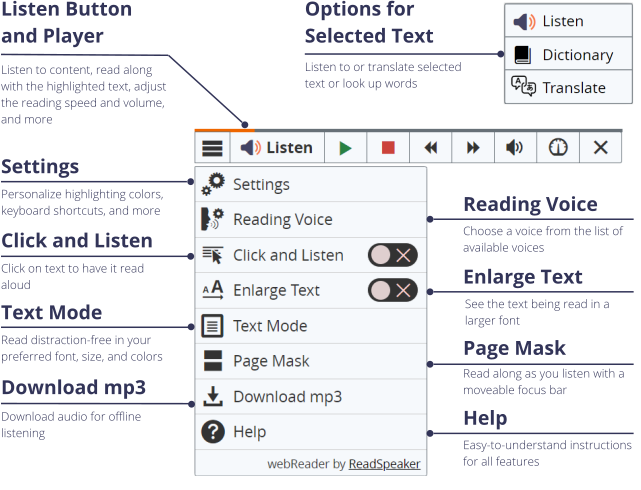
Education technology from ReadSpeaker bundles robust TTS capabilities with related learning tools so students can personalize text consumption. For example, ReadSpeaker’s cloud-based, online tool, webReader, allows students to listen to text content in more than 50 languages, with their choice of over 200 lifelike voices. They can listen to spoken text with a single click (or hotkey), or download an MP3 for offline use.
But webReader also places a variety of tools at their fingertips, including:
 (enlarge image)
 This WebReader user interface is available on learning management systems, websites, mobile apps, and more.
Bimodal presentation simply refers to information that is presented in both audio and visual formats at the same time: reading a text, listening to it, and even having words (and/or sentences) highlighted along the way.
Many learners find that bimodal presentation improves reading comprehension, information retention, and decoding (the process of matching letter combinations to audible sounds). These benefits build student confidence and create a more positive view of reading, setting the stage for a lifetime of learning.
Bimodal content presentation also aligns with Universal Design for Learning (UDL), an education framework recommended by U.S. education policies like the Every Student Succeeds Act (opens in a new tab) (ESSA). That brings us to our next question.
Universal Design for Learning (UDL) is a way of giving all learners an equal opportunity to learn, preparing the learning environment with flexible tools and materials to better meet the needs of every student.
Both an educational framework and a set of practical recommendations, UDL offers Learning Guidelines (opens in a new tab) organized into three categories:
The UDL guidelines recommend providing multiple ways for students to engage with educational experiences, providing as much choice and autonomy as possible. That keeps learners motivated.
Here’s where bimodal presentation comes into play. According to UDL, educators should provide multiple means of consuming course content. That includes the ability to customize the way information is presented. That helps students absorb and retain the information you’re trying to teach them.
Give students options for how they complete activities, including physical movement, multiple media, and access to assistive technologies.
Student choice is a recurring theme across all UDL guidelines. When you offer flexible learning experiences, every student can find the strategy that works best for them, and because every learner is different, these strategies will differ considerably.
That’s why you need bimodal presentation and appropriate digital learning tools like text to speech.
When TTS technology first became widely available, educators used it primarily to help learners with learning disabilities overcome decoding challenges so that they could concentrate on the meaning of their reading. It was also a useful tool for those with impaired vision.
That’s all still true.
In fact, TTS is a powerful tool for improving digital accessibility, a central concern for educators in the age of online learning. But text to speech serves learners with and without disabilities.
With today’s learners having become accustomed to many different ways of consuming content, depending on their various circumstances and needs, more and more frequently TTS and audio support are being used by all sorts of learners, whether they’re working with a second language, consuming a large quantity of content, multitasking, or confronting the many other individual scenarios students experience.
That said, TTS remains a powerful accessibility tool, as evidenced by its role in conforming to the global Web Content Accessibility Guidelines.
The international Web Content Accessibility Guidelines (WCAG) provide the gold standard for removing barriers to access for all web users. WCAG gets updated every few years. The current version is WCAG 2.2. Luckily, WCAG 2.2 is backwards-compatible with 2.1, so conformance with the previous version isn’t exactly outdated (which will become relevant when we discuss the ADA Title II later in this FAQ.)
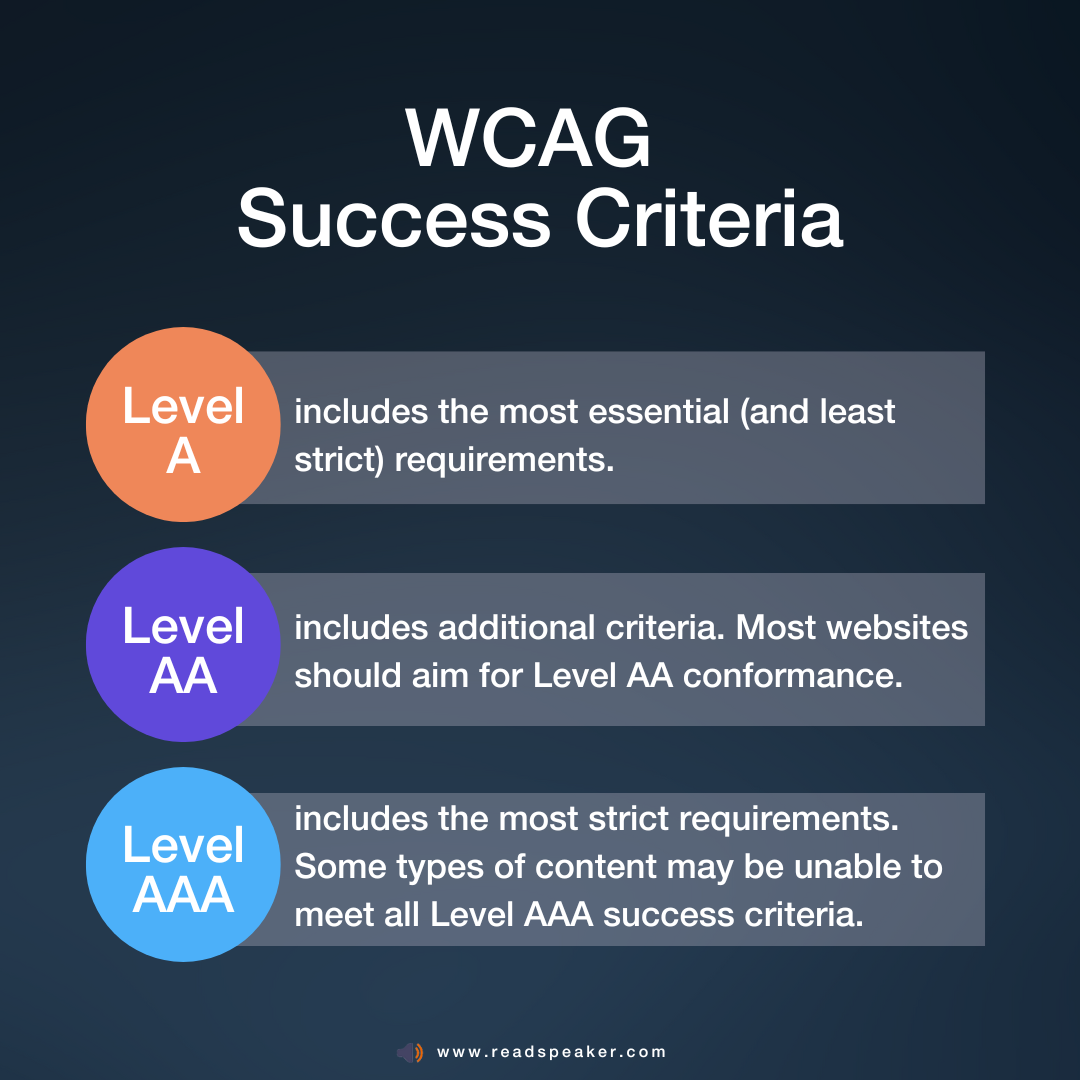
WCAG is divided into dozens of success criteria, the discrete rules web designers should follow, which are divided into three levels of conformance:
So how does TTS help conform with WCAG?
According to WCAG success criterion 3.1.5, (opens in a new tab) text must be easy to read, below lower secondary education level. Where it isn’t, you must provide a version of the text that doesn’t require high literacy skills.
Text to speech is the simplest way to comply with this (and other) WCAG rules.
Text to speech and bimodal presentation are facets of UDL, providing a number of flexible ways to meet the needs of a diverse population of individual learners, giving all learners an equal opportunity to learn and succeed.
While bimodal presentation has been used for accessibility needs for several years, learning professionals are now recognizing the benefits for everyone. A considerable amount of research has proven the effectiveness of bimodal learning on student success. According to the research, proven benefits of bimodal content presentation include:
By improving learning outcomes, text to speech helps educators and administrators succeed, too. But it can also relieve some regulatory headaches. Digital accessibility laws vary from one region to the next, but WCAG provides a global standard that tends to align with local law. (See our answer to Question #5 to start exploring the link between TTS and WCAG.)
More specifically, digital accessibility rules in the European Union, the United States, and the Middle East clarify expectations for educators, including educators involved in distance learning.
The short answer is yes. To understand why, however, we need to unpack the context.
The EAA is a European Union directive that standardizes accessibility rules across the EU. That means it sets common minimum accessibility standards that each EU member state must sign into law.
In other words, digital accessibility law may be more strict than the EAA in one nation or another.
That said, compliance with the EAA is a great place to continue ongoing efforts toward greater accessibility and inclusiveness in education. The EAA covers most digital products and services in the EU, including e-learning platforms, digital textbooks, online assessment tools, and pretty much anything else you’re likely to use in distance learning.
So how does text to speech help with EAA compliance?
Of course, the EAA only guides the European regulatory environment. In the U.S., the key rules for digital accessibility in public education are found in the ADA Title II Web Accessibility Rule, and text to speech can help educators meet these standards, too.
Again, yes, and we’ve already started to explain how. That’s because the ADA Title II Web Accessibility Rule (opens in a new tab) requires digital services in public education to conform to WCAG 2.1 Level AA success criteria.
We brought up WCAG in our answer to Question #7. As we mentioned there, WCAG divides success criteria into three levels of conformance: A, AA, and AAA.
The Title II Web Accessibility Rule requires conformance to Level AA success criteria. While none of these criteria explicitly call for TTS in the classroom, they are all based on the POUR principles mentioned in the EAA (see Question #9).
According to WCAG’s POUR principles, all digital content must be Perceivable, Operable, Understandable, and Robust (hence the acronym “POUR.”) By providing content in an audio format, TTS contributes to meeting these goals.
Besides, even prior to the publication of the Web Accessibility Rule, Title II best practices required the availability of “auxiliary aids” that ensure “effective communication” for people with disabilities. Text to speech is now and has always been such an aid.
ReadSpeaker TTS solutions provide robust protections for user data, so they comply with the most stringent privacy policies. Our products carry ISO/IEC 27001:2022 certification, which means they meet the global standards for information security, cybersecurity, and privacy protection.
Simply put, ReadSpeaker TTS tools don’t collect user information at all. Our solutions don’t collect data from our customers or the learners who use TTS. With zero data collection, our tools remain compliant with common digital privacy laws like the General Data Protection Regulation (GDPR (opens in a new tab)) in Europe and the Family Educational Rights and Privacy Act (FERPA (opens in a new tab)) in the U.S. That makes them compliant with most institutional data privacy policies, too.
Much research has been done on the results of using TTS in an educational environment, including both pilot programs and academic studies in peer-reviewed journals. This research shows that TTS improves multiple learning metrics: reading comprehension, oral reading fluency, reading speed, and overall course completion, to name just a few. Here are some examples:
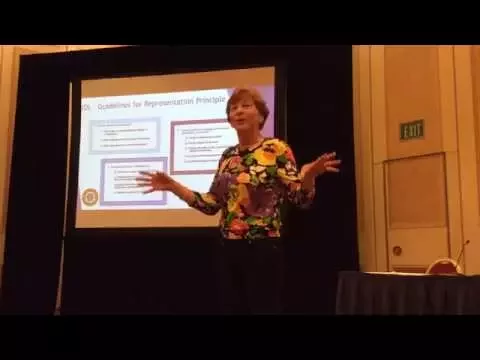
To understand the neurological processes involved in multimodal learning with TTS, and a primer on the value of Universal Design for Learning, watch Dr. Trish Trifilo’s presentation below.
Absolutely! Speech-enabled tests, quizzes, and assignments level the playing field for multi-language learners, students with disabilities, and people who naturally respond better to listening than reading.
Text to speech is a valuable accommodation for learners with disabilities. This helps institutions as well as students: TTS provides the legally mandated accommodation at a relatively low cost, reducing resource strain while improving compliance with a single solution.
Giving students the option to use TTS can help them understand instructions and test questions, without requiring proctors to intervene. That can improve testing outcomes. More importantly, it tests students on your specific learning material, not language ability.
If you’re testing students on reading skills, you can selectively disable your TTS tool. Otherwise, ReadSpeaker TTS provides a consistent listening experience across all major learning and assessment platforms. That includes remote, online, and in-person digital testing software, plus your institution’s LMS of choice.
Students view accommodations in lots of ways, from a necessary evil to lots of fun. How do they feel about text to speech?
While every student is different, the data that we have show students enjoying text to speech. Young et al.’s 2018 study (opens in a new tab) included a social validity survey that asked participants how they felt about the TTS intervention.
“The survey indicated students generally liked the TTS as an accommodation to support reading,” the authors wrote. “In addition, they generally agreed that TTS helped them to ‘remember’ the stories.”
It’s important to note that text to speech voices are a lot more enjoyable than they used to be, too, and that brings us to our next question.
Not unless you want them to be!
Like most educational technology, text to speech has evolved a lot over the past decade. The advent of artificial intelligence has led to new synthetic speech models, AI voices, that are virtually indistinguishable from human.
ReadSpeaker’s proprietary AI voice models not only sound natural, they can be customized for particular expressive styles. With over 200 AI voices to choose from, you’ll always find the ideal speaker for your learning content.
Better yet, let students choose the voice they prefer. They can even swap out voices to keep the experience fresh. Of course, we can also provide old-fashioned TTS voices if you need them for a particular effect. But, as you might suspect, people tend to prefer human-like TTS voices.
A 2022 study (opens in a new tab) found that listeners preferred human-like synthetic speech, rating lifelike voices higher in pleasantness and user acceptance compared to less realistic voices. ReadSpeaker brings warm, natural AI voices to your students in a variety of expressive speaking styles.
When discussing educational technology and assistive literacy tools, the question often arises whether using text to speech is real reading. How will students learn to read if a computer reads to them? What happens when we take it away?
The issue is not just reading, but the amount of time and energy it takes to read and whether the reader is able to do anything with the information. As Michelann Parr, a specialist on text to speech in education, says:
“I offer that it is not our role to take something away, especially if it is enabling student engagement and self-efficacy…if you introduce TTS, you’ll be amazed at just how far your students can go…”
For more expert guidance on TTS in literacy education, read our in-depth interview with Parr.
While TTS is proven to help students of all types, there are some variables that can affect outcomes.
A big one is the quality of the synthetic voice: Poor voice quality leads to an unpleasant learning experience, which leads to less usage, which keeps learners from realizing the benefits of TTS. Free TTS solutions don’t offer the best-quality voices because they can’t continually reinvest in technological improvement.
ReadSpeaker is always improving. Our proprietary machine learning models allow us to create warm, lifelike synthetic voices that listeners prefer. In fact, research suggests that today’s high-quality TTS voices can actually produce better learning results than either human voices or old text-to-speech engines.
Additionally, ReadSpeaker’s TTS tools include extra literacy features, like those we discussed in Question 2 of this FAQ (read-along highlighting, resizing text, page masks, and more).
Free TTS tools tend to be bare-bones, with fewer options for students to choose from. Many are only available for certain content, whereas ReadSpeaker supports online text, Microsoft Office Documents, PDFs, ebook file formats, and much more.
But TTS doesn’t have to be expensive to provide a great experience. Text to speech is actually a surprisingly affordable technology to provide, either on a student-by-student or campus-wide level.
Text-to-speech technology, such as ReadSpeaker’s suite of audio enhanced learning tools, is surprisingly easy to implement and use.
It’s also cost-effective. Gone are the days of choosing between robotic voices or voice actors and recording studios. With cloud-based, dynamically produced speech, course content is instantly speech-enabled as soon as it is uploaded. Even better, the advancing state of the art text to speech technology provides high-quality lifelike voices.
Implementations are often just plug-ins or lines of code that take a minimum of staff-hours to implement and maintain. Most major LMS providers offer specific integrations that simply have to be turned on.
This gives educational institutions the ability to easily provide bimodal presentation to all learners. With TTS-enabled courses, lessons, tests, quizzes, assessments, reading assignments, and any other text-based content can be read aloud while students follow along with highlighted text, letting them engage with and absorb content in multiple ways.
Text to speech gives students the choice to listen to any text content, whenever and wherever they please. Perhaps the best way to implement it is to provide access and let learners discover the use cases they prefer.
That said, many educators use TTS in specific, targeted ways to help improve learning outcomes. Here are just a few ideas:
Here’s a bonus tip: Don’t limit TTS to language-heavy subjects like English or history. It’s great for math, sciences, and corporate training topics, too! As education nonprofit Digital Promise explains (opens in a new tab), TTS is proven to help multi-language learners and students with disabilities perform better on math assessments.
“The widespread implementation of [TTS and similar innovations] has the potential not only to improve math test scores but also fundamentally transform the educational experience for all learners,” writes Digital Promise senior researcher Dr. Xin Wei.
Text to speech is being integrated in content around the world, and not only in the education sphere. From government websites to corporations, thought leaders understand and are leveraging the power of speech.
Innovative educational institutions and publishers use ReadSpeaker TTS technology to provide innovative ways to consume content. These organizations include:
ReadSpeaker users find that our technology helps them attract and retain learners, while improving learning experiences and outcomes.
Join the ranks. Let us set up a free, personalized demo so you see how easy it is to integrate audio in your institution.
Have we answered all your questions? If not don’t hesitate to contact us at +44 (0)7483 236 115 or contact@readspeaker.com.
Find out more here.
Education
Discover how ReadSpeaker and SMOWL combine academic integrity and accessibility to support reliable, inclusive online assessments within the Moodle ecosystem.
Education
How Moodle Marketplace and Certified Integrations make it easier for institutions to find trusted solutions and build more inclusive learning experiences.
Education
See how ILIAS and ReadSpeaker's text-to-speech technology work together to create more flexible learning experiences, with insights from the University of Stuttgart.