Why a basic read-aloud feature should not be confused with a strategic accessibility and compliance solution.
When organizations assess their Web Content Accessibility Guidelines (WCAG) and broader legal obligations, a practical question often emerges: If modern web browsers like Microsoft Edge, Apple Safari, or Firefox already offer a read aloud function, is that enough to support accessibility needs, or is professional text-to-speech software still required?
You are absolutely right to ask. Your visitors can indeed use the built-in speech synthesis features of their operating systems to have written text read to them. But for an enterprise, the critical question, especially when navigating the European Accessibility Act (EAA) or strict WCAG standards, is not simply “Can it talk?”, but “Is this functionality auditable, consistent, and legally sufficient?”
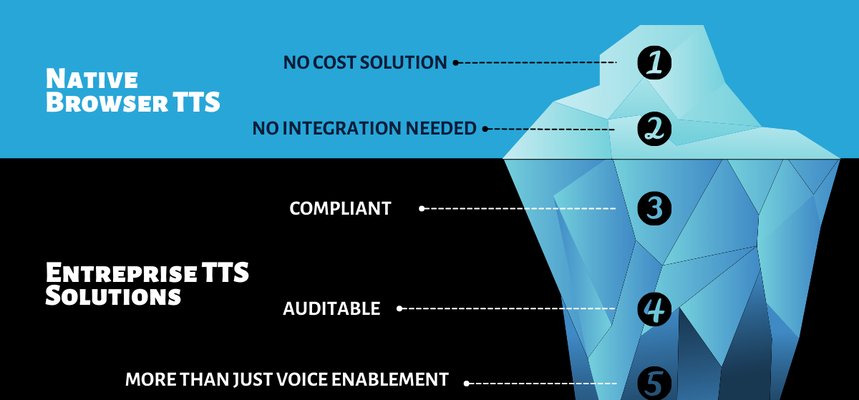
Native browser TTS is a personal convenience feature; professional text-to-speech technology is a strategic layer of assistive technology that organizations can manage, document, and improve.
Beyond Simple Audio: Understanding the Accessibility Context
In a digital environment, text-to-speech is much more than a tool for visually impaired users. It serves as a critical enhancement for a broad spectrum of users, including neurodiverse individuals with dyslexia or ADHD, people with learning disabilities, and native speakers of other languages who benefit from reading text while listening to it.
It is important to note that text-to-speech tools do not replace screen readers like JAWS, NVDA, or VoiceOver. While screen reader users (often those who are blind) rely on those tools for navigating a web page via HTML structure, headings, and alt text, text-to-speech tools provide a complementary user experience for those with reading difficulties or low vision. Professional solutions work directly within the web content layer to ensure compatibility with these existing tools.
The Four Pillars of the Enterprise Argument
To justify the investment in professional text-to-speech, we must look at the four areas where native tools fundamentally fail the corporate mission.
Pillar 1 Compliance, Governance, and Auditability
The most significant risk with native tools is the total lack of corporate control. Because browser-based read aloud functions operate within the user’s private environment, you have no way to audit or prove that the experience delivered meets legal Web Content Accessibility Guidelines.
If a regulatory body demands proof of an accessible user journey, relying on a user’s local operating systems is rarely a valid legal defense.
A professional solution provides a certified experience that remains consistent across iOS, Android, macOS, and Windows, effectively minimising regulatory risk.
Pillar 2 Supporting Neurodiversity and Literacy Needs
The true value of enterprise TTS isn’t just the audio; it is the supporting accessibility tools that browsers omit.
For users with dyslexia, ADHD, or other learning disabilities, audio alone is often insufficient. These groups require visual reinforcement, such as real-time synchronized dual highlighting of words and sentences, reading rulers, and text magnification, to improve focus.
A professional solution turns a “listening” experience into a meaningful reading session for visually impaired individuals.
Pillar 3 Comprehensive Content Coverage
Native tools often struggle with complex digital content structures, secure portals (such as banking areas), and dynamic web app environments.
Furthermore, professional text-to-speech technology extends digital accessibility to various formats, including attached PDFs and DOCX files, the “forgotten” files of the web.
By processing the HTML and headings correctly, an enterprise tool ensures your entire library is truly inclusive.
Pillar 4 Brand Control and Actionable Data
Browser native features turn your brand voice into a generic utility provided by Apple or Google.
With professional text-to-speech software, you maintain control over your “audio brand” by using high-quality, natural-sounding voices that build trust.
Perhaps most importantly, the browser offers zero data.
Enterprise-grade solutions provide an API to track engagement, allowing you to see how users interact with your web content and prove the ROI of your usability spend.
Implementation and Universal Access
Professional text-to-speech tools are typically implemented via a simple API or plugin, offering features like keyboard shortcuts for those who cannot use a mouse.
This ensures that whether a user is on Android using TalkBack, or on a desktop using open-source tools, your site remains optimized for usability.
Conclusion: From Convenience to Meaningful Support
If your only goal is simple, sporadic audio playback, a browser’s built-in tool works. But if your goal is to provide high-quality support for a neurodiverse audience, and maintain control over your brand data, professional text-to-speech software is indispensable.
Browser-based tools are useful personal conveniences; website-based text-to-speech technology is a professional governance strategy.
For organizations committed to inclusion, that distinction makes all the difference in the world of digital accessibility.

I’m Jacqueline de Pender, a Spanish-Dutch digital strategist and problem-solver.
I wear the hats of Global Marketing Strategist and Social Media Manager, channeling my energy into making sure our vision translates into perfectly timed content.
My core mission is simple: keep the content calendar balanced, and our global audience engaged. I love finding innovative ways to connect with our audience, from LinkedIn, Blogs to TikTok!
Join me in shaping the future of voice.